基于物理的大气渲染 一

image

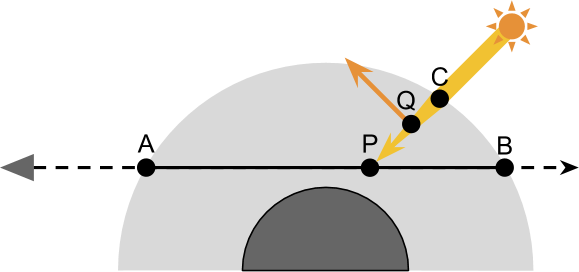
大气渲染的要点是视线上的大气范围中的每一点的光照结果都会对最终的渲染结果有影响,通过数值积分的方式,求和计算视线上的所有点P的光照,来计算最终光照效果;

单次散射只考虑太阳光从大气外部进入,经过一次折射进入相机的部分;

基本概念​​

The Transmittance Function 透射函数

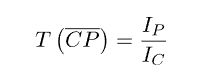
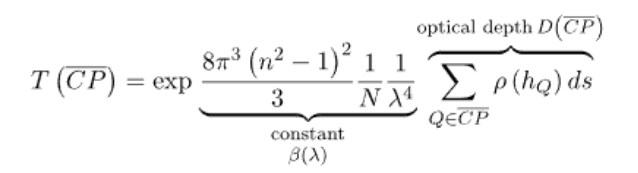
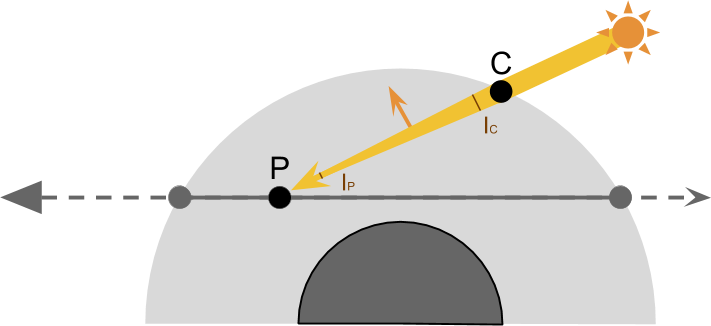
光在大气中传播会衰减损坏,这里用T(CP)表示透射率
image

image

  • IC 太阳光在C点刚进入大气层时的光量,此前光量没有散射流失
  • IP 视线上的一点P,光到达此处时的光量,从C到P的过程中有一部分光量散射出去了
  • T(CP),透射函数,计算光从C到P点的透射率,即散射后还保留的比例

The Scattering Function

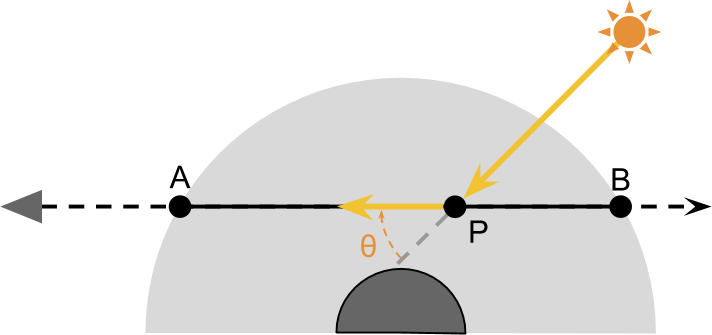
到达P点的光量中,只有一部分会散射到相机,记为S
image

image

  • λ 波长
  • θ 散射角
  • h 高度,和大气密度有关
  • T(PA) P到A处的散射率
  • IPA 到达相机的光量

渲染方程

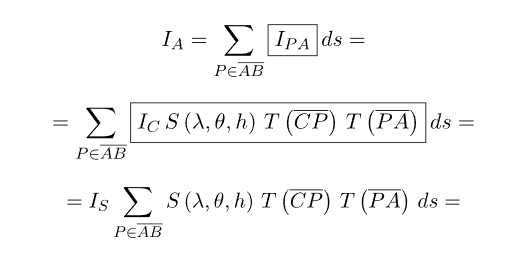
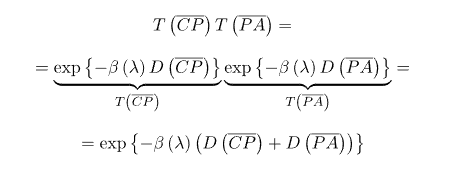
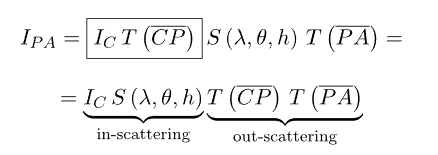
还需要考虑从P点传播到相机A点的损耗T(PA),最终在该P点的光照为:
image

不过这只是AB上一点P的计算,每一点P都需要考虑;

The Numerical Integration

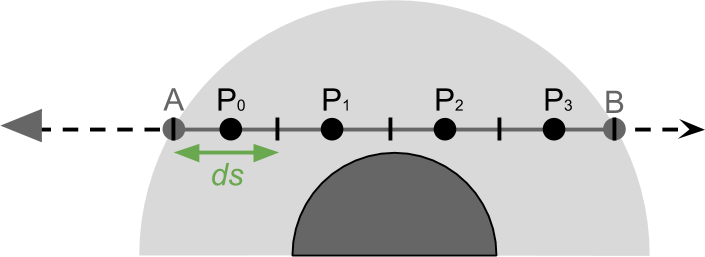
通过数值积分的方式,即分段出有限数量的P点,求和计算最终光照结果
image

image

最终的代码框架大致如下,后面会介绍s , tcp, tpa各部分的实现,这里先对整体结构有个简单的理解

1
2
3
4
5
6
7
8
9
10
float3 total = 0;
float time = tA;
float ds = (tB - tA) / (float)_ViewSamples;
for (int i = 0; i < _ViewSamples; i ++)
{
	float3 P = rayStartWS + rayDirWS * (time + ds * 0.5);

    total += (s(P) * tcp * tpa) * ds;
	time += ds;
}

Scattering 散射函数

光根据大气中粒子大小的不同,会发生不同的散射情况,当粒子大于光线波长时,会发生Mie散射,当粒子远小于光线波长时,就是Rayleigh散射的情况,先介绍Rayleigh

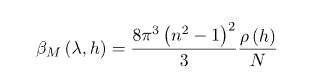
Rayleigh Scattering
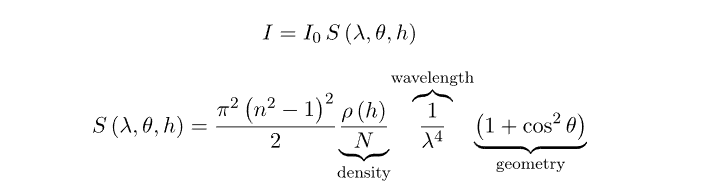
image

  • λ 是波长
  • θ 是散射角
  • h 高度
  • n = 1.00029 ,空气折射率
  • N = 2.504 · 10^25 ,标准大气的分子数密度
  • p(h) 密度比,在海平面时为1,随高度指数降低

海平面Rayleigh散射系数

为了简化求和部分,波长和角度和位置是无关的,可以当做常量提取出来,所以需要分解该等式,因为是平行日光,角度相当于常量;

通过对角度做球面积分,该等式表示所有角度的散射系数总和
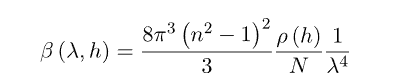
image

当h = 0,即在海平面时,p(h) = 1,即获得

image

对应代码如下

1
2
3
4
5
6
7
8
9
//Rayleigh散射系数,在海平面 β(λ) 
float RayleighScatteringCoefficient(float waveLength, float N, float n)
{
    float a = (n * n - 1);
    a *= a;
    waveLength *= waveLength;
    waveLength *= waveLength;
    return 8 * PI * PI * PI * a / (3 * N * waveLength);
}

shader中光照颜色以rgb表示,可以通过R G B颜色的波长分别计算出对应颜色的散射系数

1
2
3
4
5
6
7
8
9
    const float lambdaR = 680e-9; // 红光波长 (米)
    const float lambdaG = 550e-9; // 绿光波长 (米)
    const float lambdaB = 440e-9; // 蓝光波长 (米)

    float betaR = RayleighScatteringCoefficient(lambdaR, N, n);
    float betaG = RayleighScatteringCoefficient(lambdaG, N, n);
    float betaB = RayleighScatteringCoefficient(lambdaB, N, n);

    return float3(betaR, betaG, betaB);

优化整合到一起

1
2
3
4
5
6
7
8
9
10
float3 RayleighScatteringCoefficient(float N, float n)
{
    float3 waveRGBLength = float3(680e-9, 550, 440);
    waveRGBLength *= waveRGBLength;
    waveRGBLength *= waveRGBLength;

    float a = (n * n - 1);
    a *= a;
    return 8 * PI * PI * PI * a / (3 * N * waveRGBLength);
}

在地球上,n N 还有波长都是固定值,所以可以直接给出计算值

1
2
3
4
5
6
7
8
9
10
11
12
13
14
15
16
//Rayleigh散射系数,在地球海平面 β(λ) 
float3 RayleighScatteringCoefficientOnEarth()
{
    // float N = 2.504e25; //地球大气分子数密度 波长以nm为单位时
    // float n = 1.00029;  //地球大气折射率
    // float a = (n * n - 1);
    // a *= a;
    // waveLength *= waveLength;
    // waveLength *= waveLength;
    // return 8 * PI * PI * PI * a / (3 * N * waveLength);

    //R G B 波长分别是680 550 440

    //地球大气是固定值
    return float3(5.8e-6, 12.14e-6, 29.653-6);
}

Rayleigh散射相位

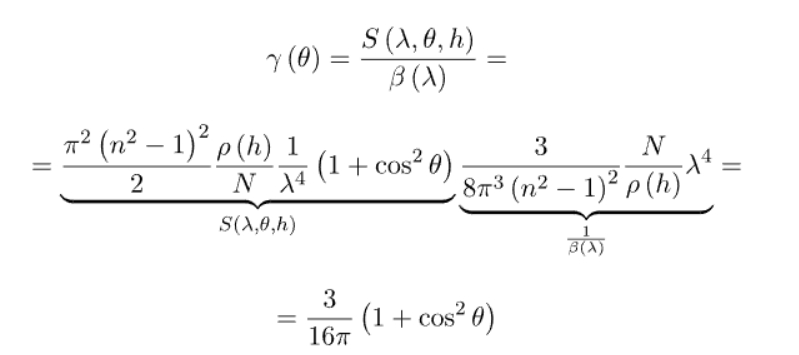
另外一部分就是和角度相关的式子,表示该角度散射的权重

image

通过S/β获取

image

1
2
3
4
5
//Rayleigh相位函数 y(cosAngle)
float3 RayleighPhase(float cosAngle)
{
    return (3.0 / (16.0 * PI)) * (1 + cosAngle * cosAngle);
}

大气密度比

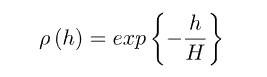
没有简单的式子可以精确的描述,可以使用指数函数来近似

image

H是尺寸高度,对于地球,通常是8500

1
2
3
4
5
//大气密度比 p(h)
float ParticleDensity(float height, float scaleHeight)
{
    return exp(-height / scaleHeight);
}

衰减系数 T(PA)image

C到P上的每一点都会散射损失一部分能量,比例是β(λ, h),在一点处单次发生:

image

在CP到每一点上都会散射,每一点的透射率相同时,总散射为

image

不同时,透射率和大气密度即高度有关,因为每一个点的p(h)都不同,这需要积分计算,该积分结果记为光学距离 D(CP)
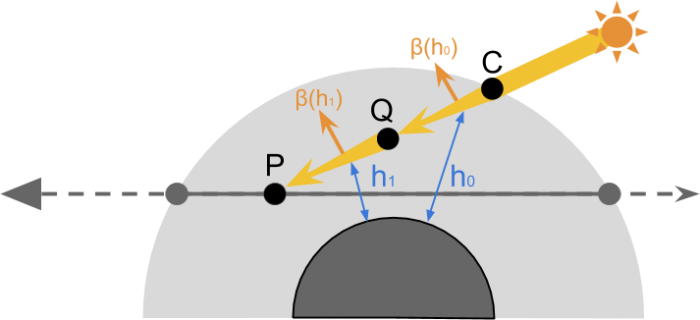
image

image

D(CP)同样通过数值积分计算,需要对p(h)部分积分

image

并且,P到A点也会有透射损失:

image

shader求和时需要求D

D(PA)直接在外层循环中计算

1
2
3
4
5
6
7
8
9
10
11
12
13
14
15
16
17
18
19
20
21
22
23
24
25
26
27
28
29
30
31
32
33
34
35
36
float3 b = RayleighScatteringCoefficientOnEarth();

float3 total = 0;
float time = tA;
float ds = (tB - tA) / (float)_ViewSamples;


float opticalDepthPA = 0;
for (int i = 0; i < _ViewSamples; i ++)
{
    float3 P = rayStartWS + rayDirWS * (time + ds * 0.5);

    float height = distance(centerWS, P) - _PlanetRadius;
    // p(h)
    float patricleDensity = ParticleDensity(height, _ScaleHeight);
    // D(PA)
    opticalDepthPA += patricleDensity * ds;

    // D(CP)
    float opticalDepthCP = 0;
    bool overground = lightSampling(P, lightDirWS, centerWS, opticalDepthCP);

    if (overground)
    {
        // Combined transmittance
        // T(CP) * T(PA) = T(CPA) = exp{ -β(λ) [D(CP) + D(PA)]}
        float3 transmittance = exp(-b * (opticalDepthCP + opticalDepthPA));

        // Light contribution
        // T(CPA) * ρ(h) * ds
        total += transmittance * patricleDensity * ds;
    }

    // total += exp(-b * (opticalDepthPA)) * patricleDensity * ds;
    time += ds;
}

D(CP)需要额外一层循环计算

1
2
3
4
5
6
7
8
9
10
11
12
13
14
15
16
17
18
19
20
21
22
23
24
25
26
bool lightSampling(float3 P, float3 S, float3 centerWS, out float opticalDepthCA)
{
    float _;
    float C;
    rayIntersect(P, S, centerWS, _AtmosphereRadius, _, C);

    // Samples on the segment PC
    float time = 0;
    float ds = distance(P, C) / (float)(_ViewSamples);
    opticalDepthCA = 0;
    for (int i = 0; i < _ViewSamples; i++)
    {
        float3 Q = P + S * (time + ds*0.5);
        float height = distance(centerWS, Q) - _PlanetRadius;
        // Inside the planet
        if (height < 0)
            return false;

        // Optical depth for the light ray
        opticalDepthCA += exp(-height / _ScaleHeight) * ds;

        time += ds;
    }

    return true;
}

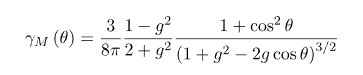
Mie Scattering

系数

image

相位

Cornette

image

1
2
3
4
5
6
7
8
9
10
11
12
13
14
15
16
17
18
19
float MieScatteringCoefficient(float N, float n)
{
    float a = (n * n - 1);
    a *= a;
    return 8.0 * PI * PI * PI * a / (3 * N);
}

float MieScatteringCoefficientOnEarth()
{
    return 0.0021;
}

float MiePhase(float g, float cosAngle)
{
    float g2 = g * g;
    float cos2 = cosAngle * cosAngle;
    float a = 1 + g2 - 2 * g * cosAngle;
    return 3.0 * (1 - g2) *(1 + cos2) / (8.0 * PI * (2 + g2) * a * sqrt(a));
}

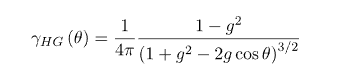
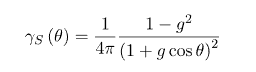
还有一些其他的相位公式

Heneye-Greenstein

image

Shlick,近似计算,效率更高

image

Shader实现

半透明 Additeve

1
2
3
4
5
Tags {"LightMode" = "UniversalForward"
    "RenderType" = "Transparent"
    "Queue" = "Transparent"}
Cull Back
Blend One One

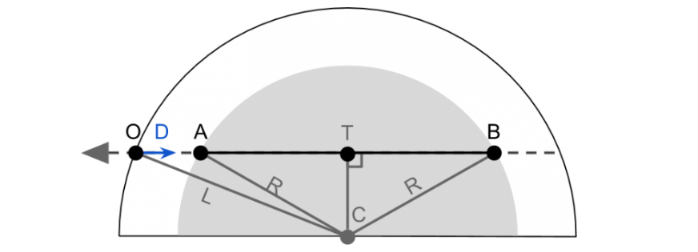
射线计算

需要求取A点和B点的位置,通过勾股定理可得

image

  • O positionWS
  • D viewDirWS
  • R 大气半径 材质属性
  • C centerWS
1
2
3
4
5
6
7
8
9
10
11
12
13
14
15
16
17
18
19
bool rayIntersect(float3 O, float3 D, float3 C, float R, out float AO, out float BO)
{
    float3 L = C - O;
    float DT = dot (L, D);
    float R2 = R * R;

    float CT2 = dot(L,L) - DT*DT;
  
    // Intersection point outside the circle
    if (CT2 > R2)
        return false;

    float AT = sqrt(R2 - CT2);
    float BT = AT;

    AO = DT - AT;
    BO = DT + BT;
    return true;
}

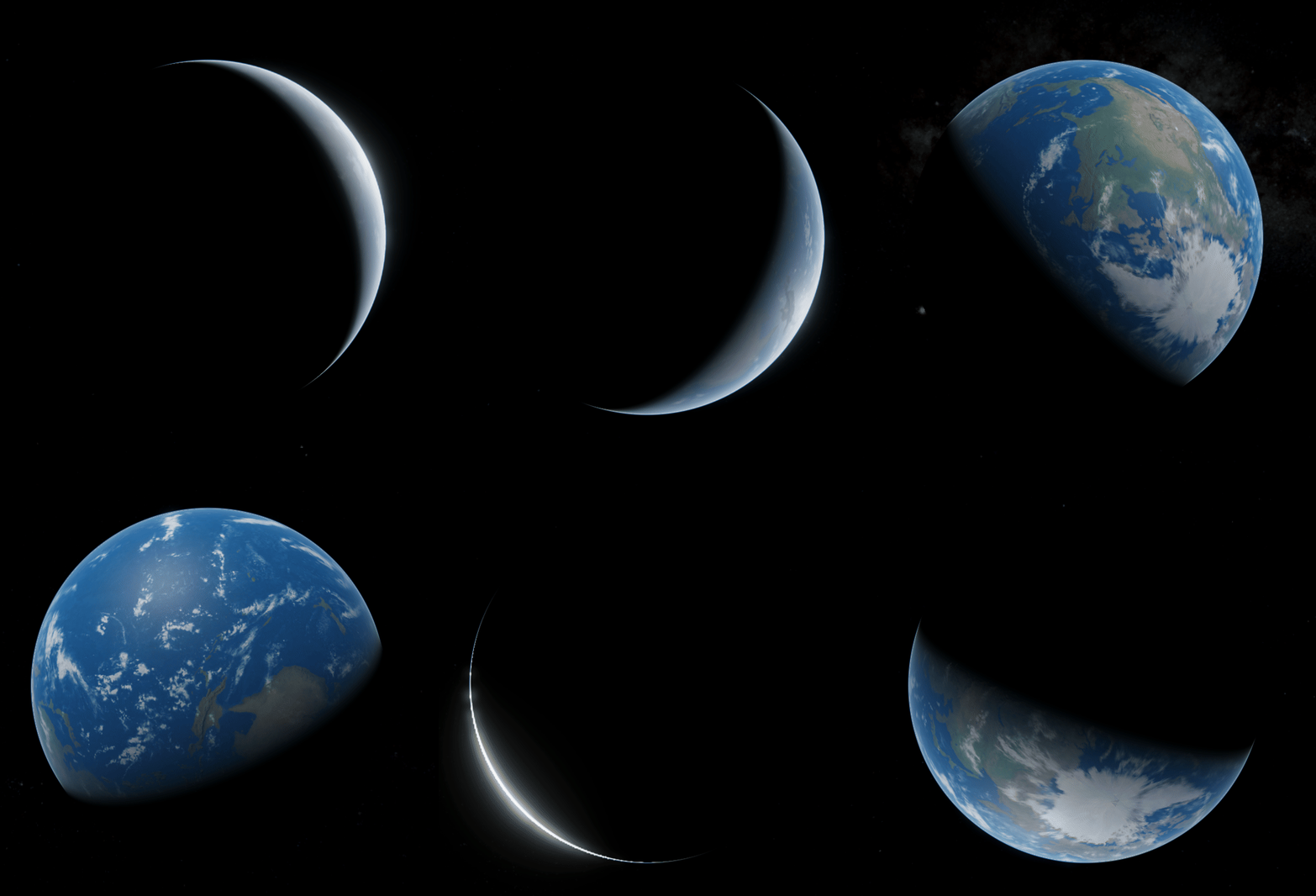
宇宙中的星球大气

基于物理的渲染,参数需要使用物理正确的参数,对于星球来说,数值一般都非常大,星球模型不可能按照正确的参数1比1大小制作

一个方法是等比的缩小各项物理参数,例如地球模型半径为6.371m时,对比真实的地球半径6371000,散射系数应β * 1000000,高度H / 1000000

另一个方法是,使用物理正确的参数,对坐标位置等数据根据比例转化,计算出rayStartWS,_SphereRadius(1.0)是模型的半径,_PlanetRadius(6371000)是地球半径

1
2
3
4
float3 lightDirWS = normalize(light.direction);
float3 rayStartWS = (i.positionWS - i.centerWS) * _PlanetRadius / _SphereRadius;  //point ray start
float3 rayDirWS = -normalize(GetWorldSpaceViewDir(i.positionWS));
float3 centerWS = float3(0, 0, 0);

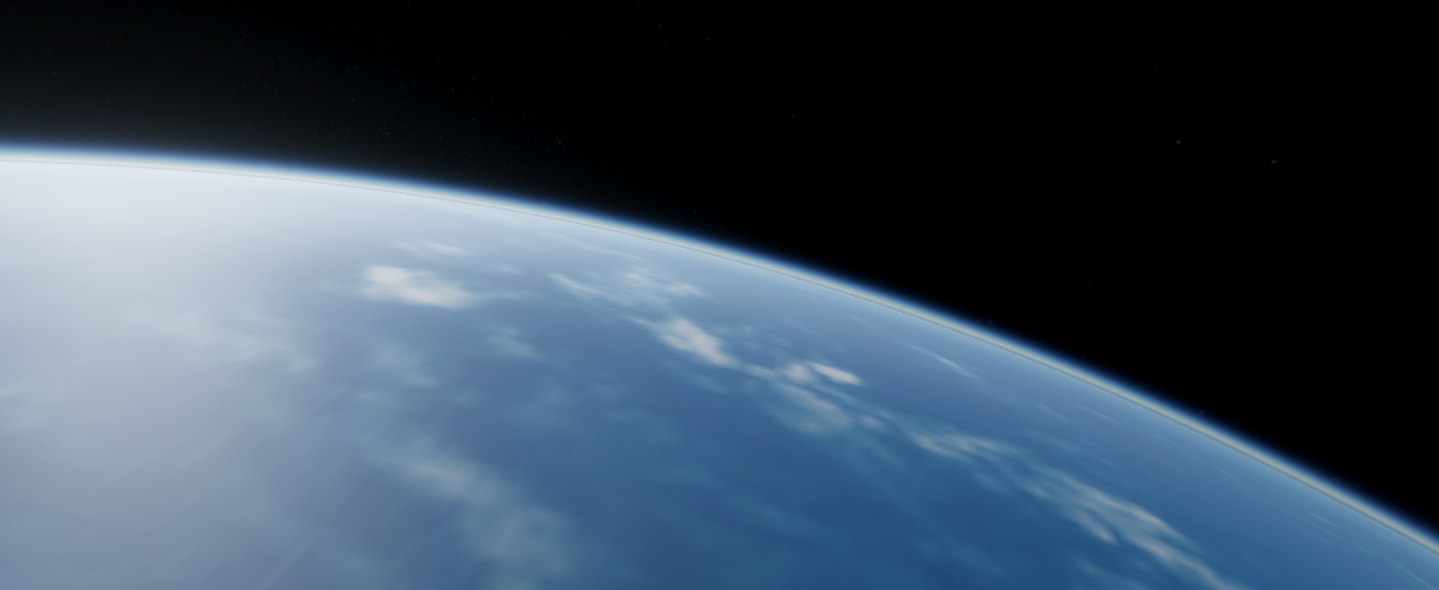
image

Mie和Rayleigh整合

需要做的是在循环计算Rayleigh时,同时计算Mie相关数据,在最后把二者的结果相加即可

D(CP)的部分

1
2
3
4
5
6
7
8
9
10
11
12
13
14
15
16
17
18
19
20
21
22
23
24
25
26
27
28
29
30
bool lightSampling(float3 P, float3 S, float3 centerWS, out float opticalDepthRay, out float opticalDepthMie)
{
    float _;
    float C;
    rayIntersect(P, S, centerWS, _AtmosphereRadius, _, C);

    opticalDepthRay = 0;
    opticalDepthMie = 0;

    // Samples on the segment PC
    float time = 0;
    float ds = C / (float)(_ViewSamples);
  
    for (int i = 0; i < _ViewSamples; i++)
    {
        float3 Q = P + S * (time + ds * 0.5);
        float height = distance(centerWS, Q) - _PlanetRadius;
        // Inside the planet
        if (height < 0)
            return false;

        // Optical depth for the light ray
        opticalDepthRay += ParticleDensity(height, _RayScaleHeight) * ds;
        opticalDepthMie += ParticleDensity(height, _MieScaleHeight) * ds;

        time += ds;
    }

    return true;
}

S和D(PA)的部分

1
2
3
4
5
6
7
8
9
10
11
12
13
14
15
16
17
18
19
20
21
22
23
24
25
26
27
28
29
30
31
32
33
34
35
36
37
38
39
40
41
42
43
44
45
46
47
48
49
50
51
52
53
54
55
56
float3 rayScatteringCoefficient = RayleighScatteringCoefficientOnEarth();
float mieScatteringCoefficient = MieScatteringCoefficientOnEarth();

float3 totalRayScattering = 0;
float totalMieScattering = 0;
float time = tA;
float ds = (tB - tA) / (float)_ViewSamples;

//D(PA)
float opticalDepthRay = 0;
float opticalDepthMie = 0;

for (int i = 0; i < _ViewSamples; i ++)
{
    float3 P = rayStartWS + rayDirWS * (time + ds * 0.5);

    float height = distance(centerWS, P) - _PlanetRadius;

    // p(h) * ds
    float particleDensityRay = ParticleDensity(height, _RayScaleHeight) * ds;
    float particleDensityMie = ParticleDensity(height, _MieScaleHeight) * ds;
    // D(PA)
    opticalDepthRay += particleDensityRay;
    opticalDepthMie += particleDensityMie;

    // D(CP)
    float lightOpticalDepthRay = 0;
    float lightOpticalDepthMie = 0;
    bool overground = lightSampling(P, lightDirWS, centerWS, lightOpticalDepthRay, lightOpticalDepthMie);
    float shadowFactor = overground ? 1.0 : 0.0;

    // Combined transmittance
    // T(CP) * T(PA) = T(CPA) = exp{ -β(λ) [D(CP) + D(PA)]}
    float3 powRay = -rayScatteringCoefficient * (lightOpticalDepthRay + opticalDepthRay);
    float mieRay = -mieScatteringCoefficient * (lightOpticalDepthMie + opticalDepthMie);
    float3 transmittance = exp(powRay + mieRay); //

    // Light contribution
    // T(CPA) * ρ(h) * ds
    totalRayScattering += transmittance * particleDensityRay * shadowFactor;
    totalMieScattering += transmittance * particleDensityMie * shadowFactor;

    time += ds;
}

// total = clamp(0, 50000, total);

float cosAngle = dot(lightDirWS, rayDirWS);


float rayPhase = RayleighPhase(cosAngle);
float miePhase = MiePhase(_MieAnisotropy, cosAngle);

float3 I = rayScatteringCoefficient * rayPhase * totalRayScattering;
I += mieScatteringCoefficient * miePhase * totalMieScattering;
I *= _SunIntensity * light.color;

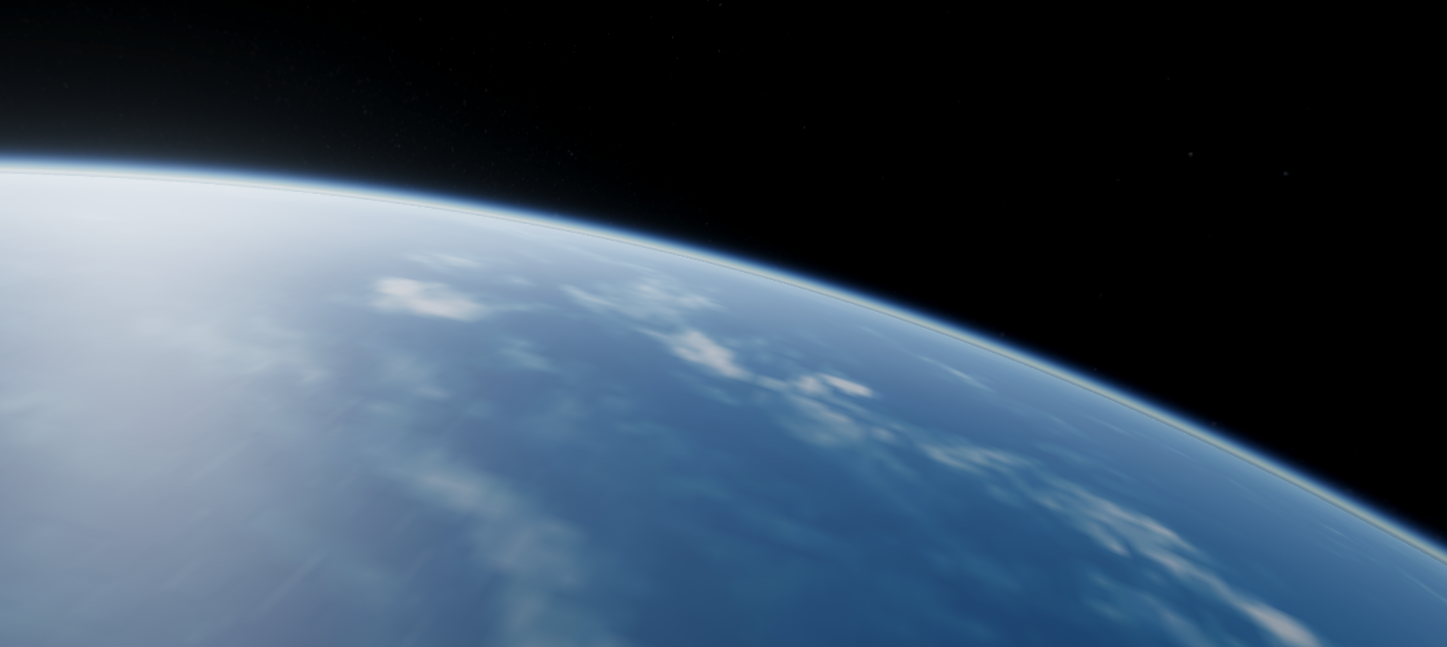
image

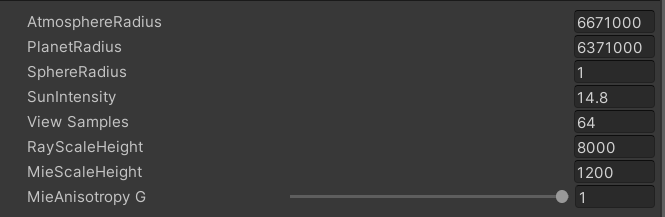
相关参数值

image

参考资料

https://www.alanzucconi.com/2017/10/10/shader-atmospheric-sphere/
https://zhuanlan.zhihu.com/p/36498679