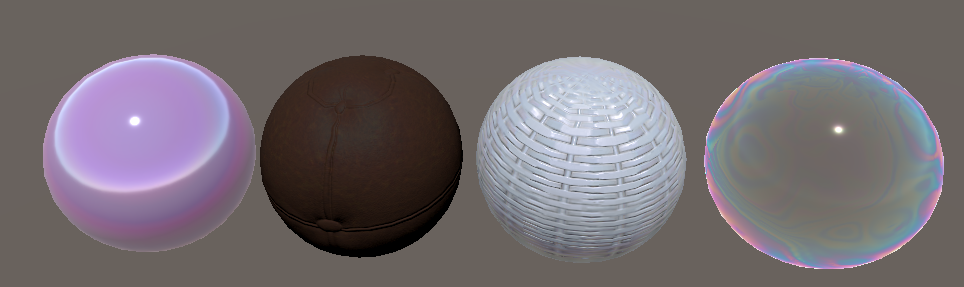
虹彩效果-薄膜干涉

image

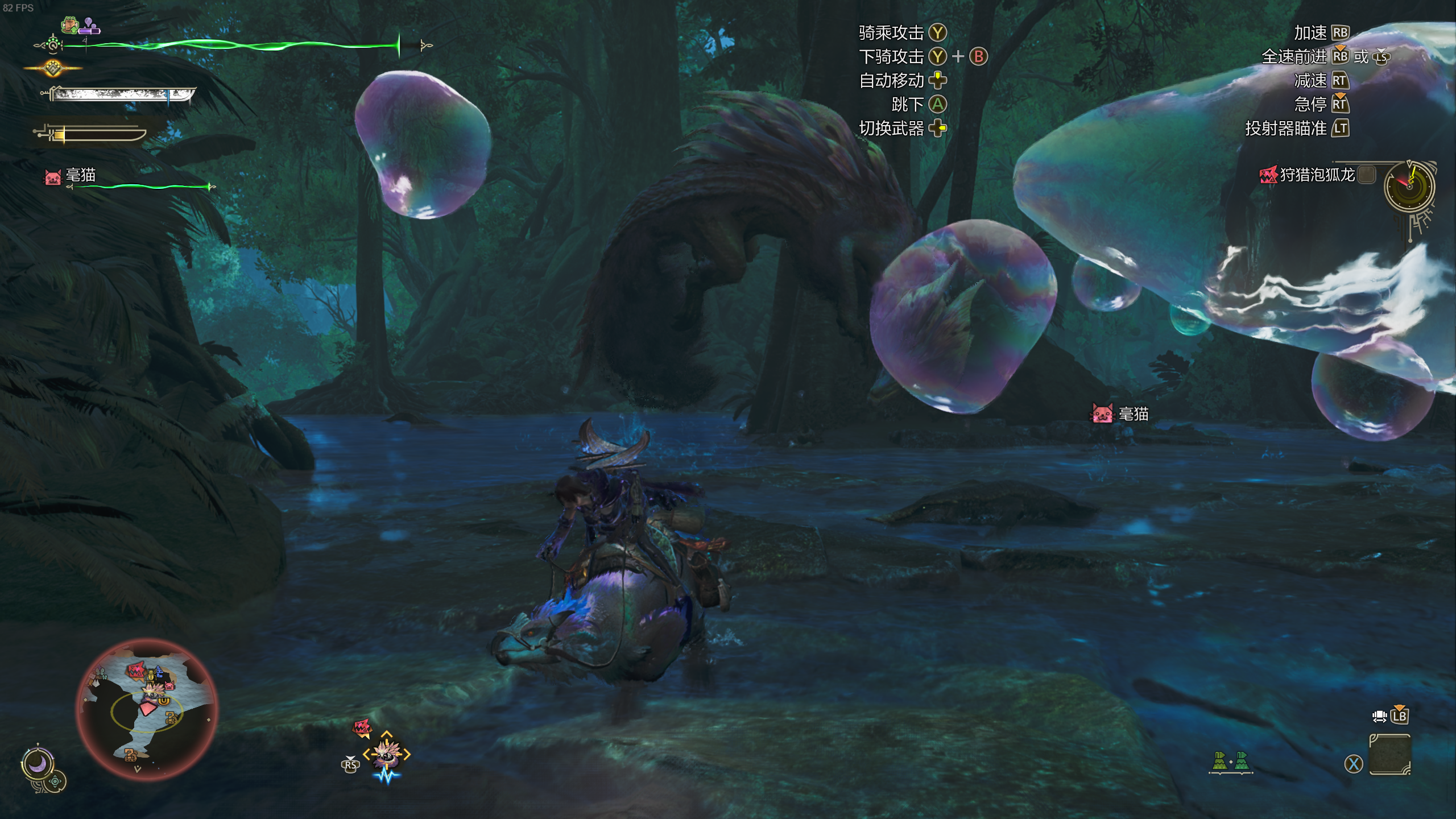
怪猎荒野新挤牙膏出的泡狐龙,只要有“新”怪还是非常好玩的;

泡狐龙泡泡的五彩,还有怪猎之前的一些材质效果,一些怪物皮毛鳞片,还有黄金油五彩斑斓的黑,都可以用虹彩来描述,专门的名词叫薄膜干涉,之前一直对这个效果有兴趣,这次整理一下。
image

光波长-虹彩颜色

先从物理意义来看,光不仅有粒子特性,还有波的特性,常规的光照模型中,光是被作为粒子来建模的,一个个光子在不同表面的折射反射计算,构建不同的光照模型;

光作为光子时,颜色由所带的能量决定,可见光的范围内,由低到高,由红色到紫色;

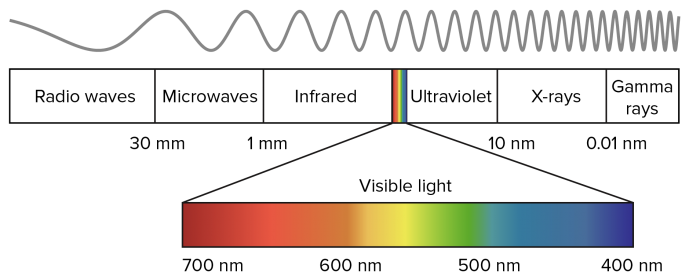
在计算薄膜干涉效果时,需要考虑到波的特性,光作为波时,与能量对应的属性是波长,波长由大到小,对应了红到紫,可见光的范围内,波长范围是700nm到400nm
image

把波长映射到颜色,可通过采样贴图或者使用函数拟合;

贴图即使用类似如下的,400nm到700nm对应的颜色:

image

贴图还有好处是可以由美术自由设计风格化的虹彩色彩;

不过纹理采样的消耗比起函数来说大的多,尤其是在薄膜干涉需要计算多次光在薄膜之间反射折射的颜色,即需要多次采样贴图映射颜色

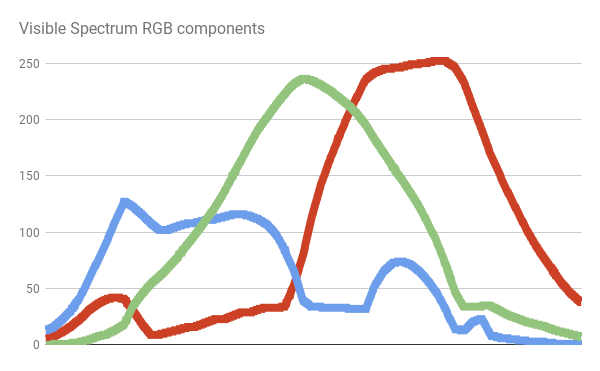
真实的人眼感知的光线颜色函数曲线如下
image

没有简单的函数可以完美拟合,有一些函数可以近似的拟合该曲线

JET Colour Scheme

1
2
3
4
5
6
7
8
9
10
11
12
13
14
15
16
17
18
// MATLAB Jet Colour Scheme
float3 spectral_jet(float w)
{
    // w: [400, 700]
    // x: [0,   1]
    float x = saturate((w - 400.0)/300.0);
    float3 c;
    if (x < 0.25)
        c = float3(0.0, 4.0 * x, 1.0);
    else if (x < 0.5)
        c = float3(0.0, 1.0, 1.0 + 4.0 * (0.25 - x));
    else if (x < 0.75)
        c = float3(4.0 * (x - 0.5), 1.0, 0.0);
    else
        c = float3(1.0, 1.0 + 4.0 * (0.75 - x), 0.0);
    // Clamp colour components in [0,1]
    return saturate(c);
}

image

Bruton Colour Scheme

1
2
3
4
5
6
7
8
9
10
11
12
13
14
15
16
17
18
19
20
21
22
23
24
25
26
27
28
29
30
31
32
33
34
35
36
37
38
39
40
41
42
43
44
45
46
47
48
49
50
51
fixed3 spectral_bruton (float w)
{
    fixed3 c;
    if (w >= 380 && w < 440)
        c = fixed3
        (
            -(w - 440.) / (440. - 380.),
            0.0,
            1.0
        );
    else if (w >= 440 && w < 490)
        c = fixed3
        (
            0.0,
            (w - 440.) / (490. - 440.),
            1.0
        );
    else if (w >= 490 && w < 510)
        c = fixed3
        (    0.0,
            1.0,
            -(w - 510.) / (510. - 490.)
        );
    else if (w >= 510 && w < 580)
        c = fixed3
        (
            (w - 510.) / (580. - 510.),
            1.0,
            0.0
        );
    else if (w >= 580 && w < 645)
        c = fixed3
        (
            1.0,
            -(w - 645.) / (645. - 580.),
            0.0
        );
    else if (w >= 645 && w <= 780)
        c = fixed3
        (    1.0,
            0.0,
            0.0
        );
    else
        c = fixed3
        (    0.0,
            0.0,
            0.0
        );
    return saturate(c);
}

模拟出了紫色

image

Bump Colour Scheme From GPU Gems

1
2
3
4
5
6
7
8
9
10
11
12
13
14
15
16
17
18
19
20
21
22
23
// GPU Gems
inline fixed3 bump3 (fixed3 x)
{
    float3 y = 1 - x * x;
    y = max(y, 0);
    return y;
}

fixed3 spectral_gems (float w)
{
       // w: [400, 700]
    // x: [0,   1]
    fixed x = saturate((w - 400.0)/300.0);
  
    return bump3
    (    fixed3
        (
            4 * (x - 0.75),    // Red
            4 * (x - 0.5),    // Green
            4 * (x - 0.25)    // Blue
        )
    );
}

避免了使用if;过渡柔和;可见光范围外是黑色;

image

Spektre Colour Scheme

1
2
3
4
5
6
7
8
9
10
11
12
13
14
15
16
17
// Spektre
fixed3 spectral_spektre (float l)
{
    float r=0.0,g=0.0,b=0.0;
    if ((l>=400.0)&&(l<410.0)) { float t=(l-400.0)/(410.0-400.0); r=    +(0.33*t)-(0.20*t*t); }
    else if ((l>=410.0)&&(l<475.0)) { float t=(l-410.0)/(475.0-410.0); r=0.14         -(0.13*t*t); }
    else if ((l>=545.0)&&(l<595.0)) { float t=(l-545.0)/(595.0-545.0); r=    +(1.98*t)-(     t*t); }
    else if ((l>=595.0)&&(l<650.0)) { float t=(l-595.0)/(650.0-595.0); r=0.98+(0.06*t)-(0.40*t*t); }
    else if ((l>=650.0)&&(l<700.0)) { float t=(l-650.0)/(700.0-650.0); r=0.65-(0.84*t)+(0.20*t*t); }
    if ((l>=415.0)&&(l<475.0)) { float t=(l-415.0)/(475.0-415.0); g=             +(0.80*t*t); }
    else if ((l>=475.0)&&(l<590.0)) { float t=(l-475.0)/(590.0-475.0); g=0.8 +(0.76*t)-(0.80*t*t); }
    else if ((l>=585.0)&&(l<639.0)) { float t=(l-585.0)/(639.0-585.0); g=0.82-(0.80*t)           ; }
    if ((l>=400.0)&&(l<475.0)) { float t=(l-400.0)/(475.0-400.0); b=    +(2.20*t)-(1.50*t*t); }
    else if ((l>=475.0)&&(l<560.0)) { float t=(l-475.0)/(560.0-475.0); b=0.7 -(t)+(0.30*t*t); }

    return fixed3(r,g,b);
}

image

Zucconi Colour Scheme

1
2
3
4
5
6
7
8
9
10
11
12
13
14
15
16
17
18
19
20
// Based on GPU Gems
// Optimised by Alan Zucconi
inline fixed3 bump3y (fixed3 x, fixed3 yoffset)
{
    float3 y = 1 - x * x;
    y = saturate(y-yoffset);
    return y;
}
fixed3 spectral_zucconi (float w)
{
    // w: [400, 700]
    // x: [0,   1]
    fixed x = saturate((w - 400.0)/ 300.0);

    const float3 cs = float3(3.54541723, 2.86670055, 2.29421995);
    const float3 xs = float3(0.69548916, 0.49416934, 0.28269708);
    const float3 ys = float3(0.02320775, 0.15936245, 0.53520021);

    return bump3y (    cs * (x - xs), ys);
}

对Bump方案的优化,同样使用二次函数,更加拟合可见光的光谱颜色

image

1
2
3
4
5
6
7
8
9
10
11
12
13
14
15
16
17
18
19
20
1
2
3
4
5
6
7
8
9
10
11
12
13
14
15
16
17
18
19
20
// Based on GPU Gems
// Optimised by Alan Zucconi
fixed3 spectral_zucconi6 (float w)
{
    // w: [400, 700]
    // x: [0,   1]
    fixed x = saturate((w - 400.0)/ 300.0);

    const float3 c1 = float3(3.54585104, 2.93225262, 2.41593945);
    const float3 x1 = float3(0.69549072, 0.49228336, 0.27699880);
    const float3 y1 = float3(0.02312639, 0.15225084, 0.52607955);

    const float3 c2 = float3(3.90307140, 3.21182957, 3.96587128);
    const float3 x2 = float3(0.11748627, 0.86755042, 0.66077860);
    const float3 y2 = float3(0.84897130, 0.88445281, 0.73949448);

    return
        bump3y(c1 * (x - x1), y1) +
        bump3y(c2 * (x - x2), y2) ;
}

使用了6个的二次函数,拟合效果更好

1
2
3
4
5
6
7
8
9
10
11
12
13
14
15
16
17
18
19
20
1
2
3
4
5
6
7
8
9
10
11
12
13
14
15
16
17
18
19
20
// Based on GPU Gems
// Optimised by Alan Zucconi
fixed3 spectral_zucconi6 (float w)
{
    // w: [400, 700]
    // x: [0,   1]
    fixed x = saturate((w - 400.0)/ 300.0);

    const float3 c1 = float3(3.54585104, 2.93225262, 2.41593945);
    const float3 x1 = float3(0.69549072, 0.49228336, 0.27699880);
    const float3 y1 = float3(0.02312639, 0.15225084, 0.52607955);

    const float3 c2 = float3(3.90307140, 3.21182957, 3.96587128);
    const float3 x2 = float3(0.11748627, 0.86755042, 0.66077860);
    const float3 y2 = float3(0.84897130, 0.88445281, 0.73949448);

    return
        bump3y(c1 * (x - x1), y1) +
        bump3y(c2 * (x - x2), y2) ;
}

image

shader中计算光波长

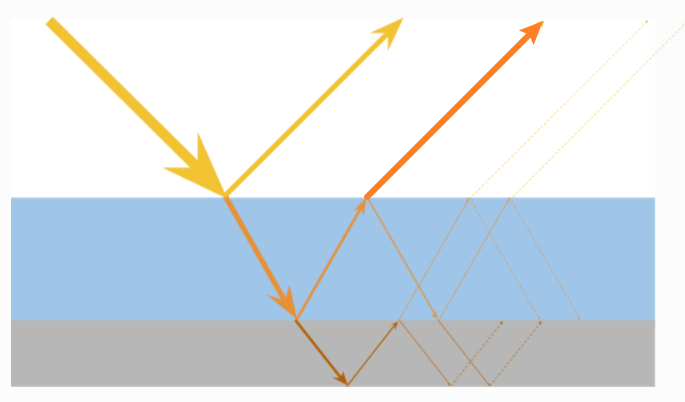
薄膜干涉时,一束光线会有折射和反射的部分,折射的部分经过内部反射也会最终折射出来,如图
image

黄色的直接反射的部分,和橙色经过内部最终由折射出的部分,它们着色位置、方向是一致的,不同的地方在于光传播的距离不同,在薄膜中反射折射会有非常多次,渲染时一般只考虑到第二次折射;

另一点需要注意的是,同一点处的第一次反射(黄色)和第二次折射(橙色)实际上来自两束光线(他们的位置偏移,正好让那两条反射折射光线重合,能够互相干涉),在面不平的时候确实会有误差,这点近似误差是可以忽略的;
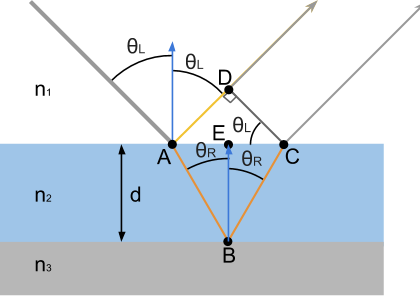
image

两次出射光的传播路程不一致,乃至于光波的相位不同;相位可以理解为所在光波函数的位置,在波峰或者波谷等不同位置,其能量会相互抵消或增强,最终体现出某一波长的颜色;

它们路径的差称为光程差(OPD),在介质密度不同时,因为光的传播速度不同,需要受不同的折射率影响

image

该值某种程度上能体现相位偏移,通过三角函数和Snell’s law (n1·sinθL = n2·sinθR)推导
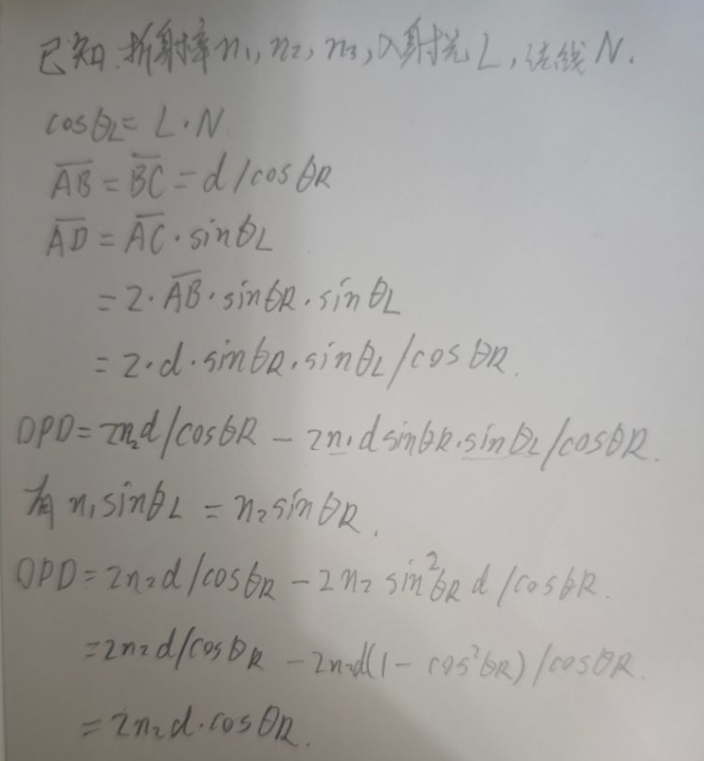
image

更详细的推导可以看这里

当OPD是波长的整数倍时,说明同相,则该波长的颜色会被增强

2 π OPD = nw

n是整数倍,w是波长,在shader中,可以通过w = OPD / n获得该处是何波长的颜色

渲染时,常规表面有的数据是入射光L,法线N,他们的夹角是θL,还是通过Snell’s law计算得到θR

1
2
3
4
5
6
7
8
9
10
11
12
float cos_thetaL = dot(N, L);
float thetaL = acos(cos_thetaL);
float sin_thetaR = (_N1 / _N2) * sin(thetaL);
float thetaR = asin(sin_thetaR);

float u = _N2 * 2 * d * abs(cos(thetaR));

float3 color = 0;
for(int n = 1; n <= _Order; n++)
{
     color += spectral_zucconi6(u * 2 * PI/n);
}

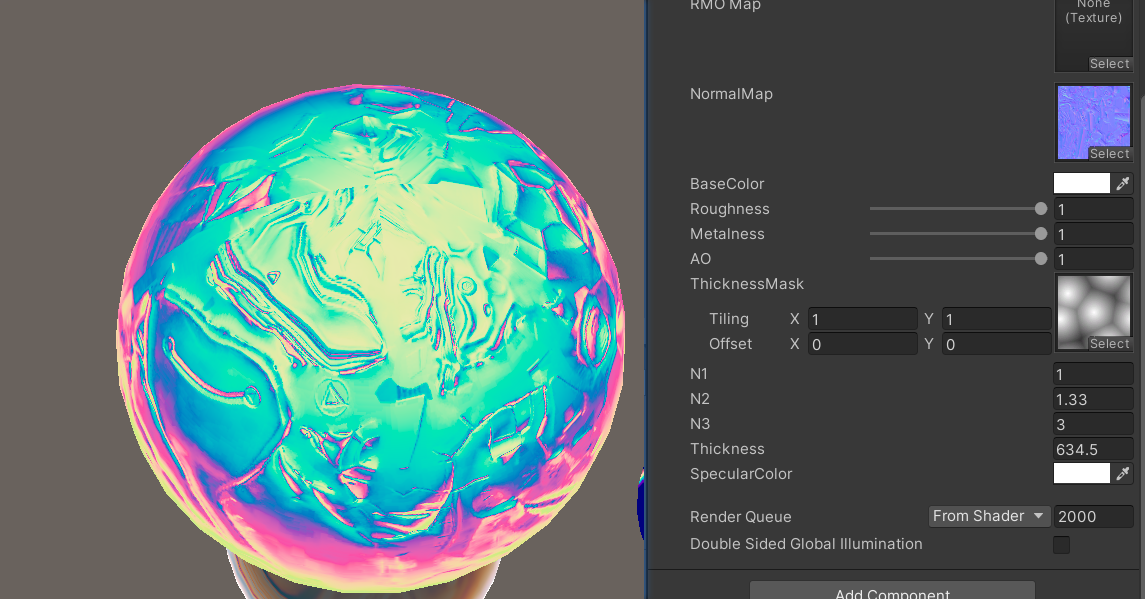
这样就可以获取虹彩的比较物理的颜色,注意波长单位是nm,所以不作处理的情况下,_Thickness需要比较大的数值
image

还有一点,当光从低折射率N1的介质传播到高折射率N2的介质时,它的相位会发生跳跃π度,相当于波峰变成了波谷,第二次折射从N2到N3时,如果N2也是小于N3,相位再次跳变后相当于没变,这种情况下,我们上面的代码是正确的;

另一种情况就是N1到N2和N2到N3只发生了一次跳变,需要把相位偏移考虑在内,即

1
2
3
4
5
6
7
8
9
10
11
12
13
14
15
16
// A phase shift of 180 degrees occurs on the reflected ray when
// travelling from A to B AND NA < NB
float shift = 0;
if (
    // Phase shift of first ray
    (_N1 < _N2)
    !=
    // Phase shift of second ray
    (_N2 < _N3)
)
    shift += 0.5;
half3 color = 0;
for(int n = 1; n < _Order; n++)
{
    color += spectral_zucconi6(u * 2 * PI/(n + shift));
}

整合到PBR光照模型中

虹彩效果通过修改常规PBR BRDF 中的F项,具体是替换F0来实现,F项原本也是贡献了光线角度相关的反射率,包括反射颜色。

1
2
3
4
5
6
7
8
9
10
float3 diffuse = DiffuseFromMetallic(albedo, metallic);
float3 F0 = SpeculerColorFormMetallic(albedo, metallic);

half thickness = _ThicknessMask.Sample(sampler_ThicknessMask, i.uv * _ThicknessMask_ST.xy + _ThicknessMask_ST.zw).r;
thickness *= _Thickness;
F0 *= lerp(1, IrideColor(normalWS, halfDirWS, thickness), _IrideMask);

float3 F = F__Schlick(F0, dothl);
float G = G__SmithGGX(roughness, dotnl, dotnv);
float D = D__GGX(roughness, dotnh);

image

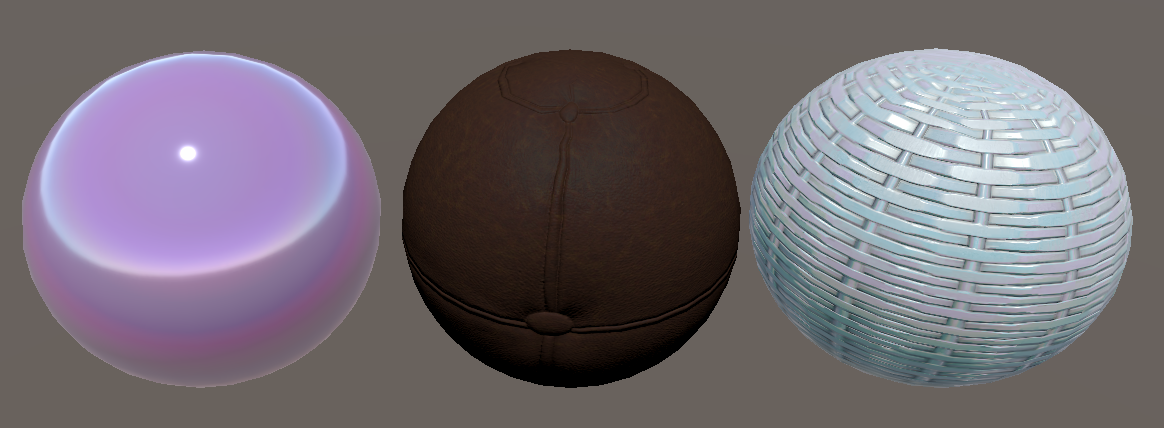
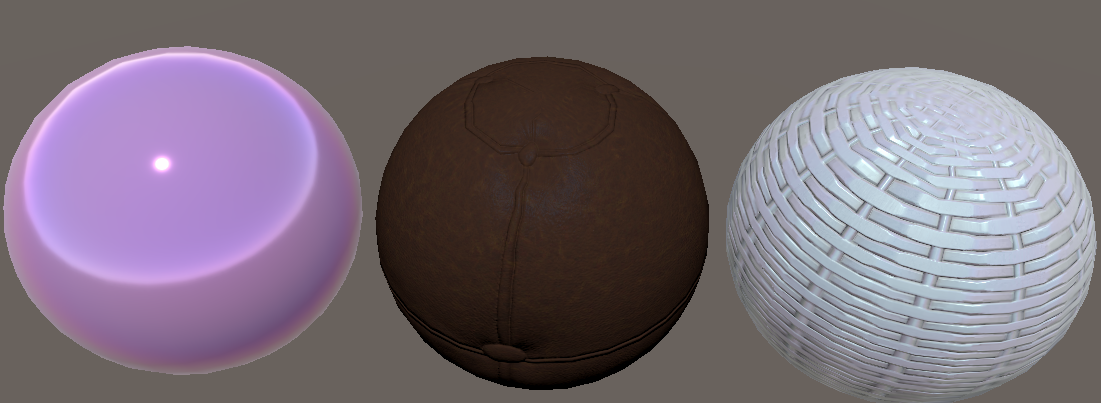
虹彩车漆-皮革-金属

Unity HDRP 的实现

技术出自A Practical Extension to Microfacet Theory for the Modeling of Varying Iridescence

Unity对其做了一些工程上的简化优化
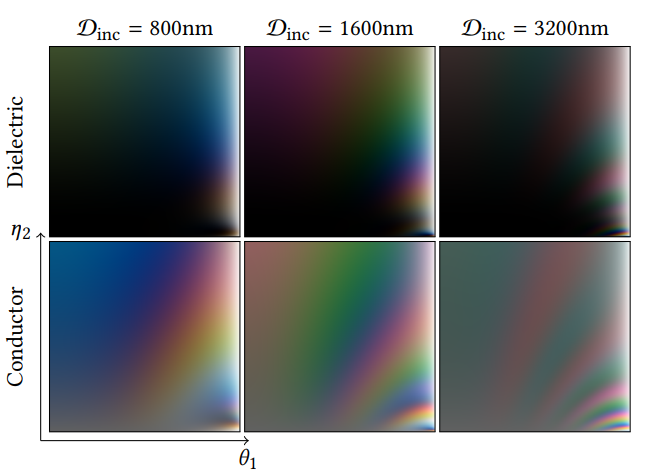
image

image

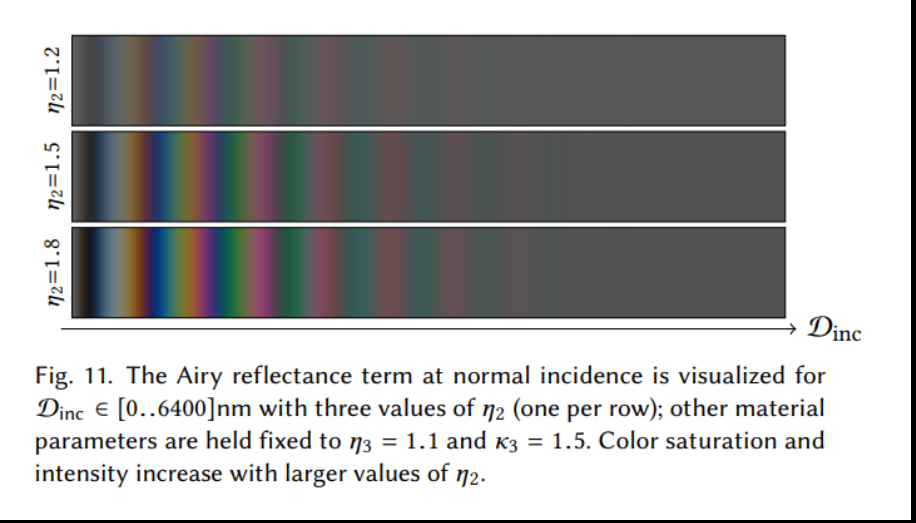
论文里提到不同折射率,光程差,角度都可以预积分出对应的干涉颜色贴图,EvalSensitivity应该是选择了一种常规比较适用的折射率下的情况的拟合函数

这个函数直接拟合了不同光程差(2 · n2 · d · cos)下的干涉颜色结果,不必像上面那样进行多次for循环模拟

1
2
3
4
5
6
7
8
9
10
11
12
13
14
15
16
17
18
19
20
21
22
23
24
static const half3x3 XYZ_2_REC709_MAT = {
     3.2409699419, -1.5373831776, -0.4986107603,
    -0.9692436363,  1.8759675015,  0.0415550574,
     0.0556300797, -0.2039769589,  1.0569715142
};

// Ref: https://belcour.github.io/blog/research/2017/05/01/brdf-thin-film.html
// Evaluation XYZ sensitivity curves in Fourier space
real3 EvalSensitivity(real opd, real shift)
{
    // Use Gaussian fits, given by 3 parameters: val, pos and var
    real phase = 2.0 * PI * opd * 1e-6;
    real3 val = real3(5.4856e-13, 4.4201e-13, 5.2481e-13);
    real3 pos = real3(1.6810e+06, 1.7953e+06, 2.2084e+06);
    real3 var = real3(4.3278e+09, 9.3046e+09, 6.6121e+09);
    real3 xyz = val * sqrt(2.0 * PI * var) * cos(pos * phase + shift) * exp(-var * phase * phase);
    xyz.x += 9.7470e-14 * sqrt(2.0 * PI * 4.5282e+09) * cos(2.2399e+06 * phase + shift) * exp(-4.5282e+09 * phase * phase);
    xyz /= 1.0685e-7;

    // Convert to linear sRGb color space here.
    // EvalIridescence works in linear sRGB color space and does not switch...
    real3 srgb = mul(XYZ_2_REC709_MAT, xyz);
    return srgb;
}

论文里提到,只关注Dinc = 2 n2 d,用Dinc作为一项变量,这里沿用了,看注释应该能推测出是以默认的n2 = 1.5的情况模拟干涉颜色的

默认了n1 < n2 < n3,eta_2 = lerp(2.0, 1.0, iridescenceThickness); 让只使用一个参数控制,这里不太标准的计算出了n2

1
2
3
4
5
6
7
8
9
10
11
12
13
14
15
16
17
18
19
20
21
22
23
24
25
26
27
28
29
30
31
32
33
34
35
36
37
38
39
40
41
42
43
44
45
46
47
48
49
50
51
52
53
54
55
56
57
58
59
60
61
62
63
64
65
66
67
68
69
70
71
72
73
74
75
76
77
78
79
80
81
82
83
84
85
86
87
88
89
90
91
// Evaluate the reflectance for a thin-film layer on top of a dielectric medum.
//eta_1 = 1.0 default air
//cosTheta1 = dotNV
real3 EvalIridescence(real eta_1, real cosTheta1, real iridescenceThickness, real3 baseLayerFresnel0, real iorOverBaseLayer = 0.0)
{
    real3 I;

    // iridescenceThickness unit is micrometer for this equation here. Mean 0.5 is 500nm.
    real Dinc = 3.0 * iridescenceThickness;

    // Note: Unlike the code provide with the paper, here we use schlick approximation
    // Schlick is a very poor approximation when dealing with iridescence to the Fresnel
    // term and there is no "neutral" value in this unlike in the original paper.
    // We use Iridescence mask here to allow to have neutral value

    // Hack: In order to use only one parameter (DInc), we deduced the ior of iridescence from current Dinc iridescenceThickness
    // and we use mask instead to fade out the effect
    real eta_2 = lerp(2.0, 1.0, iridescenceThickness);
    // Following line from original code is not needed for us, it create a discontinuity
    // Force eta_2 -> eta_1 when Dinc -> 0.0
    // real eta_2 = lerp(eta_1, eta_2, smoothstep(0.0, 0.03, Dinc));
    // Evaluate the cosTheta on the base layer (Snell law)
    real sinTheta2Sq = Sq(eta_1 / eta_2) * (1.0 - Sq(cosTheta1));

    // Handle TIR:
    // (Also note that with just testing sinTheta2Sq > 1.0, (1.0 - sinTheta2Sq) can be negative, as emitted instructions
    // can eg be a mad giving a small negative for (1.0 - sinTheta2Sq), while sinTheta2Sq still testing equal to 1.0), so we actually
    // test the operand [cosTheta2Sq := (1.0 - sinTheta2Sq)] < 0 directly:)
    real cosTheta2Sq = (1.0 - sinTheta2Sq);
    // Or use this "artistic hack" to get more continuity even though wrong (no TIR, continue the effect by mirroring it):
    //   if( cosTheta2Sq < 0.0 ) => { sinTheta2Sq = 2 - sinTheta2Sq; => so cosTheta2Sq = sinTheta2Sq - 1 }
    // ie don't test and simply do
    //   real cosTheta2Sq = abs(1.0 - sinTheta2Sq);
    if (cosTheta2Sq < 0.0)
        I = real3(1.0, 1.0, 1.0);
    else
    {

        real cosTheta2 = sqrt(cosTheta2Sq);

        // First interface
        real R0 = IorToFresnel0(eta_2, eta_1);
        real R12 = F_Schlick(R0, cosTheta1);
        real R21 = R12;
        real T121 = 1.0 - R12;
        real phi12 = 0.0;
        real phi21 = PI - phi12;

        // Second interface
        // The f0 or the base should account for the new computed eta_2 on top.
        // This is optionally done if we are given the needed current ior over the base layer that is accounted for
        // in the baseLayerFresnel0 parameter:
        if (iorOverBaseLayer > 0.0)
        {
            // Fresnel0ToIor will give us a ratio of baseIor/topIor, hence we * iorOverBaseLayer to get the baseIor
            real3 baseIor = iorOverBaseLayer * Fresnel0ToIor(baseLayerFresnel0 + 0.0001); // guard against 1.0
            baseLayerFresnel0 = IorToFresnel0(baseIor, eta_2);
        }

        real3 R23 = F_Schlick(baseLayerFresnel0, cosTheta2);
        real  phi23 = 0.0;

        // Phase shift
        real OPD = Dinc * cosTheta2;
        real phi = phi21 + phi23;

        // Compound terms
        real3 R123 = clamp(R12 * R23, 1e-5, 0.9999);
        real3 r123 = sqrt(R123);
        real3 Rs = Sq(T121) * R23 / (real3(1.0, 1.0, 1.0) - R123);

        // Reflectance term for m = 0 (DC term amplitude)
        real3 C0 = R12 + Rs;
        I = C0;

        // Reflectance term for m > 0 (pairs of diracs)
        real3 Cm = Rs - T121;
        for (int m = 1; m <= 2; ++m)
        {
            Cm *= r123;
            real3 Sm = 2.0 * EvalSensitivity(m * OPD, m * phi);
            //vec3 SmP = 2.0 * evalSensitivity(m*OPD, m*phi2.y);
            I += Cm * Sm;
        }

        // Since out of gamut colors might be produced, negative color values are clamped to 0.
        I = max(I, float3(0.0, 0.0, 0.0));
    }

    return I;
}

image

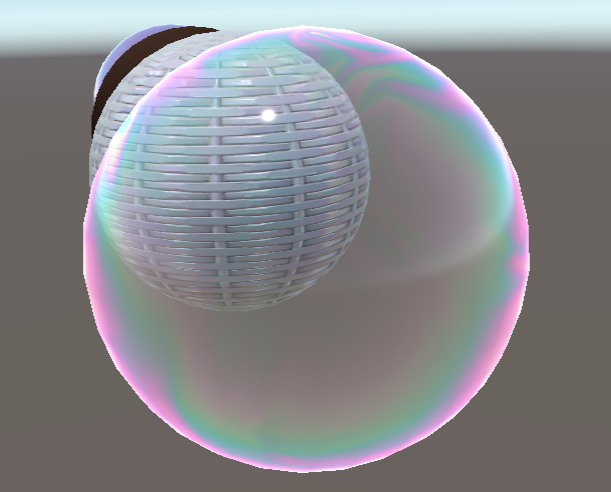
虹彩泡泡

泡泡等半透明对象的实现还是比较Hack的

替换漫反射部分使用虹彩颜色作为基础反射颜色,rim计算中心半透明效果,

1
2
3
4
5
6
7
8
9
10
11
float cosTheta = lerp(dotnh, dotnv, _UseNHOrNV);
#ifdef _IRIDEMODE_SPECTRAL
    float3 rainbow = IrideColor(cosTheta, thickness) * _SpecularColor.rgb;
#elif _IRIDEMODE_HDRP
    float3 rainbow = EvalIridescence(_N2, cosTheta, thickness, 0.5);
    rainbow = saturate(rainbow);
#endif
float3 color = rainbow * _BaseColor.rgb;

float rimAlpah = 1 - dotnv * 0.8;
alpha *= rimAlpah * rimAlpah;

另外加上直接高光和间接光部分

1
2
float3 spec = F * G * D/ (4 * dotnl * dotnv + 1e-4h);
float4 finalColor = float4(color + indirectColor + spec, alpha);

image