Splatoon3喷漆渲染复现

image

简介

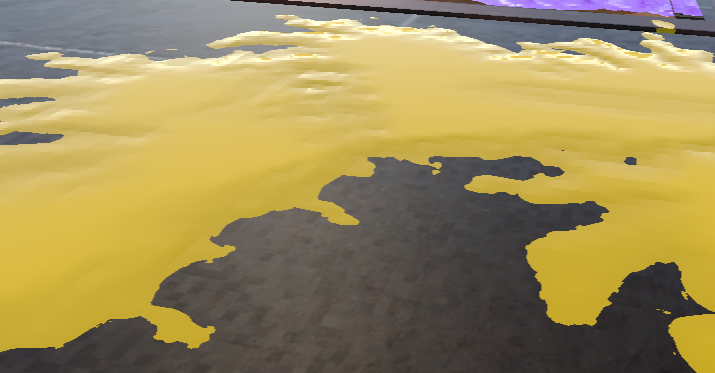
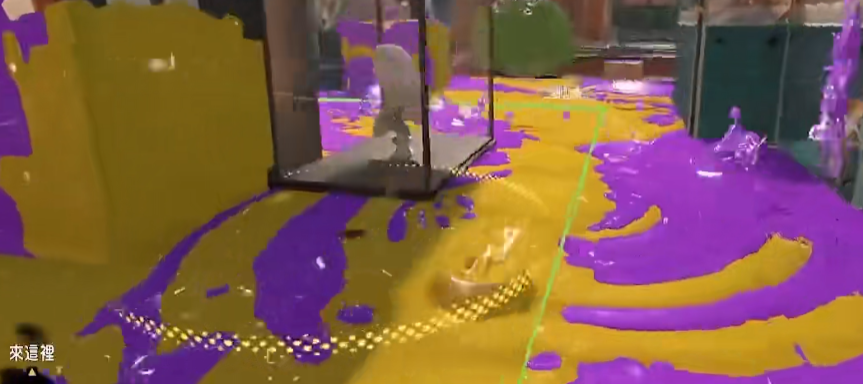
可以先在这里看一下最终效果

做法总结来说,就是使用1张比较大的RenderTexture记录整个场景的墨水区域;可喷漆地面和墙面特别的展一个类似lightmapUV的不重叠splatUV;既使用这个uv去把墨水绘制到RenderTexture上,地面墙面的墨水的渲染也使用这个uv去采样RenderTexture获取墨水区域;

这次的许多做法是为了尽可能的还原Splatoon3中的效果(例如一发墨水同时只能在一面墙或地面上留下墨迹,这偏离了现实,或许是为了玩法考量)

RenderTexture
image

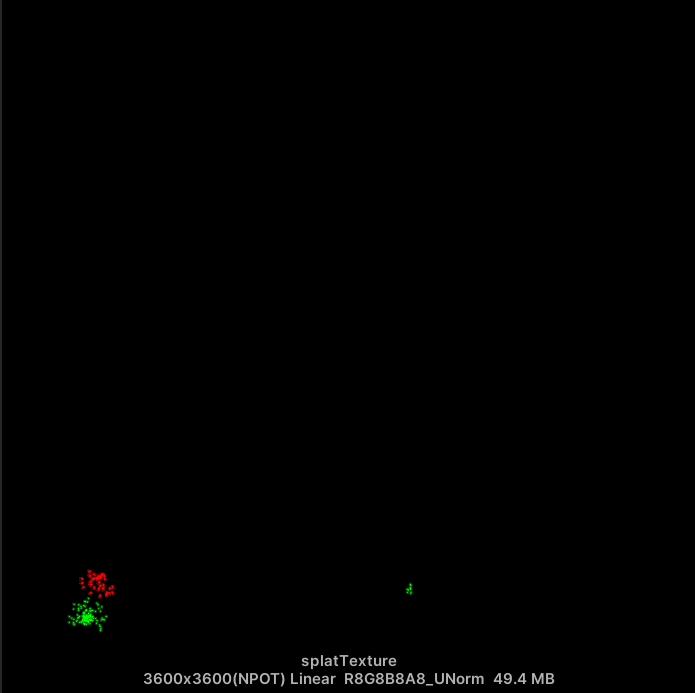
只是用一张RenderTexture记录整个场景的,包括2个队伍的(三色对战?甚至Splatoon4可能的4色对战)墨水的痕迹,所以只能选择一个通道记录一个队伍的墨水痕迹;

至于每个队伍的墨水颜色,可以通过全局设置传递给材质,不必再RenderTexture中记录。

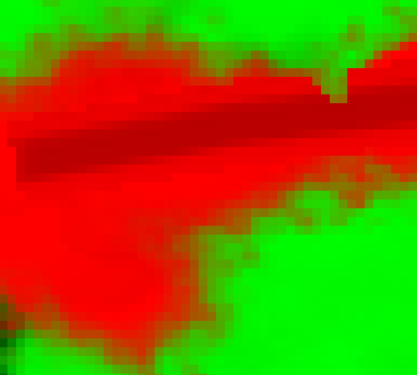
另外通道记录的不是非0即1的颜色,而是带有渐变的高度信息的,这可以帮助制作出更丰富的墨水效果
image

Splatoon3中不同的武器、技能、大招绘制的墨水形状都是不同的,一把枪的每一发子弹、甚至子弹与墙面、地面的不同角度,留下的形状都不相同,这需要一些不同样式的遮罩贴图,绘制RenderTexture时,把Mask贴图传递进去,同时,还需要的信息有绘制的uv位置、mask的缩放、旋转、哪一方队伍等等数据:
image

1
2
3
4
5
6
7
8
9
TEXTURE2D(_SplatRenderTexture);			//RenderTexture
SAMPLER(sampler_SplatRenderTexture);
TEXTURE2D(_Mask);						//墨水形状Mask贴图
SAMPLER(sampler_Mask);
float2 _Scale;							//缩放
float2 _UV;								//绘制的位置
int _Team;								//队伍
float _Rotate;							//旋转
int _Type;								//类型,0添加,1替换 用于潜行痕迹

Mask贴图

绘制RenderTexture的shader核心代码:

1
2
3
4
5
6
7
8
9
10
11
12
13
14
15
16
17
18
19
20
21
22
23
24
25
26
27
28
29
30
31
32
33
34
35
36
37
38
39
40
41
42
43
44
45
46
47
48
49
50
51
52
float4 frag(v2f i) : SV_TARGET{
    float4 splat = _SplatRenderTexture.Sample(sampler_SplatRenderTexture, i.uv);
	//移动
    float2 uv = i.uv - _UV;
    //旋转
    float cosA = cos(_Rotate);
    float sinA = sin(_Rotate);
    uv = float2(
        uv.x * cosA - uv.y * sinA,
        uv.x * sinA + uv.y * cosA
    );
	//缩放
    uv *= float2(1.0, 1.0) / _Scale;
    //到[0, 1]
    uv += 0.5;
    //clamp掉[0,1]以外的部分的mask
    float2 outrange = step(0, uv) * step(uv, 1);

    uv.y = 1 - uv.y;

    float4 mask = _Mask.Sample(sampler_Mask, uv);
    float4 result = splat;

    if(_Type == 0) //添加
    {
        float clear = smoothstep(0.05,0.1, mask.r);

        float4 add = float4(-clear.rrrr);
        if(_Team == 0)
        {
            add.x = mask.r;
        }
        else{
            add.y = mask.r;
        }

        result = splat + add * outrange.x * outrange.y;
    }
    else //修改痕迹
    {  
        float oldMask = _Team == 0 ? splat.r : splat.g;
        oldMask = lerp(oldMask, mask.g * 2, step(0.01, oldMask) * outrange.x * outrange.y * mask.g);
        if(_Team == 0){
            result.r = oldMask;
        }
        else{
            result.g = oldMask;
        }
    }

    return saturate(result); 

需要特别提一下,在绘制墨水时,需要清理掉其他队伍的墨水通道,但是又不能完全清理掉,需要用smoothstep留下一些过度,因为在物体上渲染敌我双方边际的墨水时,需要冗余空间避免留下一些缝隙没有任何一方的墨水,也就是这里:

1
2
3
4
5
6
7
8
9
10
float clear = smoothstep(0.05,0.1, mask.r);

float4 add = float4(-clear.rrrr);
if(_Team == 0)
{
    add.x = mask.r;
}
else{
    add.y = mask.r;
}

cpu侧调用绘制的代码核心如下:

1
2
3
4
5
6
7
8
9
10
11
12
13
14
15
16
17
buffer.SetGlobalTexture(splatRenderTextureId, tempTexture);
var texture = splatData.splatMasks[command.textureId];
buffer.SetGlobalTexture(maskTextureId, texture);
buffer.SetGlobalVector(scaleId, command.scale);
buffer.SetGlobalVector(uvId, command.uv);
buffer.SetGlobalInt(teamId, command.teamId);
buffer.SetGlobalFloat(rotateId, command.rotate);
buffer.SetGlobalInt(typeId, command.type);

buffer.SetRenderTarget(splatTexture);
buffer.DrawProcedural(Matrix4x4.identity, splatPaintMaterial, 0, MeshTopology.Triangles, 3);

buffer.SetRenderTarget(tempTexture);
buffer.Blit(splatTexture, tempTexture);

Graphics.ExecuteCommandBuffer(buffer);
buffer.Clear();

还需要一张tempTexture来暂存rendertexture,避免同时读写,这么大的图同时存在两张对于内存方面确实比较费。

物体上墨水的渲染

image

柔和的边缘

image

上面RenderTexture很大,但是具体到绘制一发子弹的墨水的局部,使用的像素依然很少

分辨率很低的情况下,如何避免明显锯齿的边缘?

可以参考这里的做法

我的代码如下,我只考虑了双色对战的情况

1
2
3
4
5
6
7
8
9
10
11
12
13
14
15
16
17
18
19
float4 splatMask = _SplatTexture.Sample(sampler_SplatTexture, uv1);
float4 noise = _SplatNoise.Sample(sampler_SplatNoise, uv1 * _SplatUVParams.x);

float mask1 = splatMask.r;
float mask2 = splatMask.g;

float mask = saturate(mask1 + mask2);
if(mask - noise.r * _SplatUVParams.y < 0.01)
{
    return;
}
else
{
  
    float lerpMask = step(_SplatUVParams.z, mask - noise.r * _SplatUVParams.y);
    float lerpMask1 = step(_SplatUVParams.z, mask1 - mask2 - noise.r * _SplatUVParams.y);
    float3 splatColor = lerp(_SplatColor2, _SplatColor1, lerpMask1);
    ...
}

墨水的高光

RenderTexture中一个通道储存的一方墨水遮罩是带有深度的,依据这个深度,通过ddx ddy构建法线,然后计算高光;我这里直接修改的是PBR的各项数据,没有给墨水部分特别的光照模型。

顺便一提,还经过各种尝试,计算了一个normaMask,他得到的法线,能尽可能在边缘有高光,中心部分较平整。

1
2
3
4
5
6
7
8
9
10
11
12
13
14
15
16
17
18
	//尽可能的只让边缘法线变化
    float normalMask = 1-mask;
    normalMask *= normalMask;
    // normalMask *= normalMask;
    normalMask = 1 - normalMask;
    float ddxMask = ddx(normalMask);
    float ddyMask = ddy(normalMask);
    float3 normal = float3(0.0,0.0,1.0);
    normal.x = -ddyMask;
    normal.y = ddxMask;
    normal.xy *= _SplatUVParams.a;
    normalTS = lerp(normalTS, normalize(normal), lerpMask);

    metallic = lerp(metallic, 0.0, lerpMask);
    smoothness = lerp(smoothness, 0.99, lerpMask);

    baseColor = lerp(baseColor, splatColor, lerpMask);
}

模型的splatUV

模型的splatUV有以下要求

1、一个场景的所有可涂色物体的uv不能有重叠

2、连续的地面的uv是连续的,避免接缝

3、不连续的地面,所有的墙面之间的uv不能连续,且有一定间隔,避免错误溢出到其他表面,同时也符合Splatoon3的GamePlay

4、物体的空间大小和其uv所占的大小是成比例的,这可以减轻绘制RenderTexture,计算个队伍染色面积这些工作的复杂度

5、uv的展开方向是一致的,墨水Mask的方向绘制到RenderTexture中的旋转计算,如果uv展开方向不一致,则需要额外考虑uv的展开方向对旋转方向的影响,uv的展开方向还不太好获取

考虑到Splatoon3场景中大多数需要涂色的物体,实际上都属于地形的范畴,另外这些部分可以分离出来非常简单的面片模型,所以离线把splatUV制作到这些模型上是可接受的。

另外因为获取uv位置依赖unity的射线检测,而射线检测只提供到了uv1,所以这次把splatUV放到了uv1

cpu端涉及渲染的部分代码

获取RenderTexture数据,判断踩得哪方墨水

1
2
3
4
5
6
7
8
9
10
11
12
13
14
15
16
17
18
19
20
21
22
23
24
25
26
27
28
29
30
31
Ray ray = new Ray(transform.position, -transform.up);
RaycastHit hit;
var splatTex = SplatManager.Instance.splatTexture;
var layerMask = LayerMask.GetMask("Ground");
if(Physics.Raycast(ray, out hit, layerMask)){                      
    var uv = hit.textureCoord2;
    laseUV = uv;

    var pos = hit.point;
    var dis = Vector3.Distance(transform.position, pos);
    // Debug.Log(dis);
    if(Vector3.Distance(transform.position, pos) < 1.0f)
    {
        isGround = true;
    }
    else{
        isGround = false;
    }

    int x = Mathf.RoundToInt(uv.x * splatTex.width);
    int y = Mathf.RoundToInt(uv.y * splatTex.height);
    AsyncGPUReadback.Request(splatTex, 0, x, 1, y, 1, 0, 01, TextureFormat.RGBA32,
        (req) => {
            var colorArray = req.GetData<Color32>();
            // Debug.Log(colorArray.Length);
            if(colorArray.Length > 0){
                groundSplatColor = colorArray[0];
            }
        }
    );
}

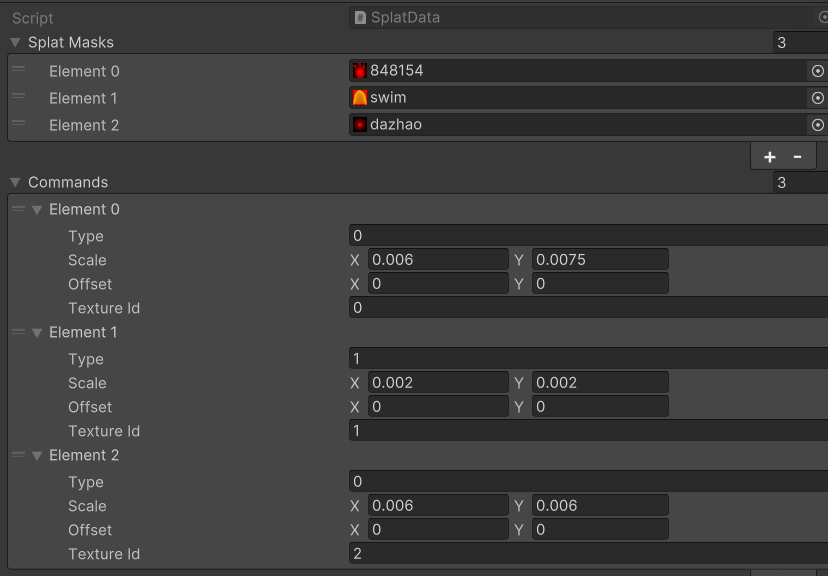
绘制数据类,用于配置墨水数据

image

1
2
3
4
5
6
7
8
9
10
11
12
13
14
15
16
    [System.Serializable]
    public struct SplatCommandData
    {
        public int type; //0 change, 1 add
        public Vector2 scale;
        public Vector2 offset;
        public int textureId;
    }

    [CreateAssetMenu(fileName = "NewSplatCommandData", menuName = "Data/SplatCommandData", order = 1)]
    public class SplatData : ScriptableObject
    {
        public Texture2D[] splatMasks;
        public SplatCommandData[] commands;
      
    }

绘制指令结构体

1
2
3
4
5
6
7
8
9
10
11
    public struct SplatCommand
    {
        public int teamId;
        public Vector2 uv;
        public int type; //0 change, 1 add
        public float rotate;
        public Vector2 scale;
        public Vector2 offset;
        public int textureId;
        // public Vector4 uvParams => new Vector4(scale, rotate, offset.x, offset.y);
    }

发射子弹碰撞体,需要使用射线检测获取uv位置

1
2
3
4
5
6
7
8
9
10
11
12
13
14
15
16
17
18
19
20
21
22
23
24
25
26
27
28
29
30
31
32
    void RaycastForUV(float offset = 0)
    {
        Ray ray = new Ray(transform.position + transform.forward * offset, transform.forward);
        RaycastHit hit;

        // Debug.DrawRay(transform.position, transform.forward, Color.red, 3f, false);
    
        var layerMask = LayerMask.GetMask("Ground");
        // 检测射线与物体的碰撞
        if (Physics.Raycast(ray, out hit, 10f, layerMask))
        {
            // Debug.Log(hit.collider.name);
            lastUV = hit.textureCoord2;
            // hit.
        }
    }
    void OnTriggerEnter(Collider other)
    {
        if(toDraw != 0)
        {
            return;
        }
        // 判断子弹是否碰到敌人或其他物体
        if (other.CompareTag("Ground") && toDraw ==0)  // 根据标签判断
        {
            Debug.Log("Ground!!" + lastUV);
            RaycastForUV(-0.5f);
        
            toDraw = 1;
            Destroy(gameObject, 0.5f);        // 销毁子弹
        }
    }

粒子系统涂色类,同样依赖射线检测

1
2
3
4
5
6
7
8
9
10
11
12
13
14
15
16
17
18
19
20
21
22
23
24
25
26
27
28
29
30
31
32
33
34
35
36
37
38
39
40
41
42
43
44
45
46
47
48
49
50
51
52
53
54
55
56
57
public class ParticlesSplat : MonoBehaviour
{
    public int team;
    public int splatCommandId = 0;

    [Space]
    ParticleSystem part;
    List<ParticleCollisionEvent> collisionEvents;
    private SplatCommandData splatCommandData;


    void Start()
    {
        part = GetComponent<ParticleSystem>();
        collisionEvents = new List<ParticleCollisionEvent>();

        splatCommandData = SplatManager.Instance.splatData.commands[splatCommandId];
    }

    void OnParticleCollision(GameObject other)
    {
        int numCollisionEvents = part.GetCollisionEvents(other, collisionEvents);

      
        if (other.CompareTag("Ground"))
        {
            for (int i = 0; i < numCollisionEvents; i++)
            {
                Vector3 pos = collisionEvents[i].intersection;
                var direciton = collisionEvents[i].velocity.normalized;

                // Debug.Log("Ground!!" + lastUV);
                RaycastForUV(-0.5f, pos, direciton);
            }
        }
    }

    void RaycastForUV(float offset, Vector3 pos, Vector3 dir)
    {
        Ray ray = new Ray(pos + dir * offset, dir);
        RaycastHit hit;

        // Debug.DrawRay(transform.position, transform.forward, Color.red, 3f, false);
      
        var layerMask = LayerMask.GetMask("Ground");
        // 检测射线与物体的碰撞
        if (Physics.Raycast(ray, out hit, 10f, layerMask))
        {
            // Debug.Log(hit.collider.name);
            var lastUV = hit.textureCoord2;

            // hit.
            var angle = Mathf.Atan2(dir.z, dir.x) + 0.5f * Mathf.PI;// * Mathf.Rad2Deg;
            SplatCommandPool.Instance.AddCommand(team, lastUV, splatCommandData.type, angle , splatCommandData.scale,splatCommandData.offset,splatCommandData.textureId);
        }
    }
}

可能可以做的优化

RenderTexture的绘制还是太费了,或许可以考虑使用ComputeShader来一次绘制完所有绘制指令,但这需要把所有可能用到的Mask打包成TextureArray,然后不传染单个texture,而是传入textureIndex

参考

https://discussions.unity.com/t/how-do-they-do-the-painting-in-splatoon/658039/10

https://www.bilibili.com/video/BV1Fe411T7qf/?spm_id_from=333.1245.0.0&vd_source=1599bc708e0ac08b02de3d09474f49b4